A certain kind of post is common enough on r/homeassistant to be its own genre. Someone automated a workshop, a small shop, a short-term rental, or a single-tenant facility on Home Assistant, it worked well for a year or two, and then it started showing strain right around the point the setup stopped being a hobby and became how a piece of the business actually runs. A second person needs to see the dashboard from their own phone. Someone asks for six months of temperature logs. A compressor or a well pump needs watching, not just a smart plug. None of that means Home Assistant did anything wrong. It means the job in front of it changed shape. This is a look at where that line tends to sit, what actually changes once a setup crosses it, and what the real options look like from there.
In This Article
- What "Home Assistant for Business" Actually Requires
- Your Real Options, Side by Side
- How It Connects to Home Assistant and Your Equipment
- Getting Told When Something Is Wrong
- Watching Trends Over Time
- A Low-Pressure Way to Try It
- The Bottom Line
What "Home Assistant for Business" Actually Requires
The r/homeassistant threads that describe this moment share a shape, even when the details differ: a greenhouse operator watching irrigation and climate across several bays, a small manufacturer with a hobby-grade setup quietly running a compressor and a dust collector, a landlord tracking HVAC and leak sensors across a few rental units. Home Assistant handled the early version of each of these fine, sometimes for years. What tends to change is not the platform, it is the requirements the setup is now expected to meet:
- More than one person needs access, on their own terms. A single admin login works for a household. A business usually needs a manager who sees everything, a technician who can acknowledge an alarm without being able to rewire an automation, and maybe a client who should see status and nothing else.
- Downtime has a cost attached to it. A dropped automation at home is an inconvenience. A dropped monitoring feed at a facility that depends on it is a missed alarm, and a missed alarm has a dollar figure behind it.
- Somebody eventually asks for a history. An insurer, an inspector, a landlord, or your own curiosity about why a pump keeps cycling wants a trend over weeks, not a snapshot of right now.
- The equipment itself changes. A workshop compressor, a walk-in cooler, a well pump, or a small production line is more likely to speak Modbus or OPC UA than Zigbee or Z-Wave, protocols built for consumer smart-home hardware rather than industrial equipment.
None of this is a knock on Home Assistant. It is, deservedly, the default answer for home automation, and for a large share of the r/homeassistant community it will stay the right tool indefinitely. The shift above is specific: it is what changes when a setup stops serving one household and starts serving a business.
Your Real Options, Side by Side
Once a setup crosses that line, there are, in practice, three directions to go, and naming them side by side is the fastest way to see where each one fits.
Stay on Home Assistant and build around the gaps. A determined operator can get a long way. Community integrations exist for most of what is missing, and HACS has an add-on for nearly everything. The tradeoff is that this now depends on whoever assembled it, and a system whose reliability rests on one person's YAML files and add-on choices is a real risk once that person is unavailable, which matters more for a business than for a hobby.
Move to a traditional SCADA or building-management platform. Products like Ignition are built for exactly the reliability, multi-user, and industrial-protocol requirements described above, and do it extremely well. The tradeoff is scale and cost: that category is priced and scoped for a plant or a large facility with a systems integrator involved, which is a lot of platform and a lot of budget for a single workshop or small facility.
ControlBird, the platform we make, was built for the gap between those two: the same approachable, no-code, visual-builder experience Home Assistant is known for, extended with what a small business tends to need once the stakes go up. That means role-based access for a real team instead of one shared login, industrial protocols such as Modbus and OPC UA alongside the consumer-facing ones, and a built-in historian for the trend someone eventually asks you for, Community edition included.
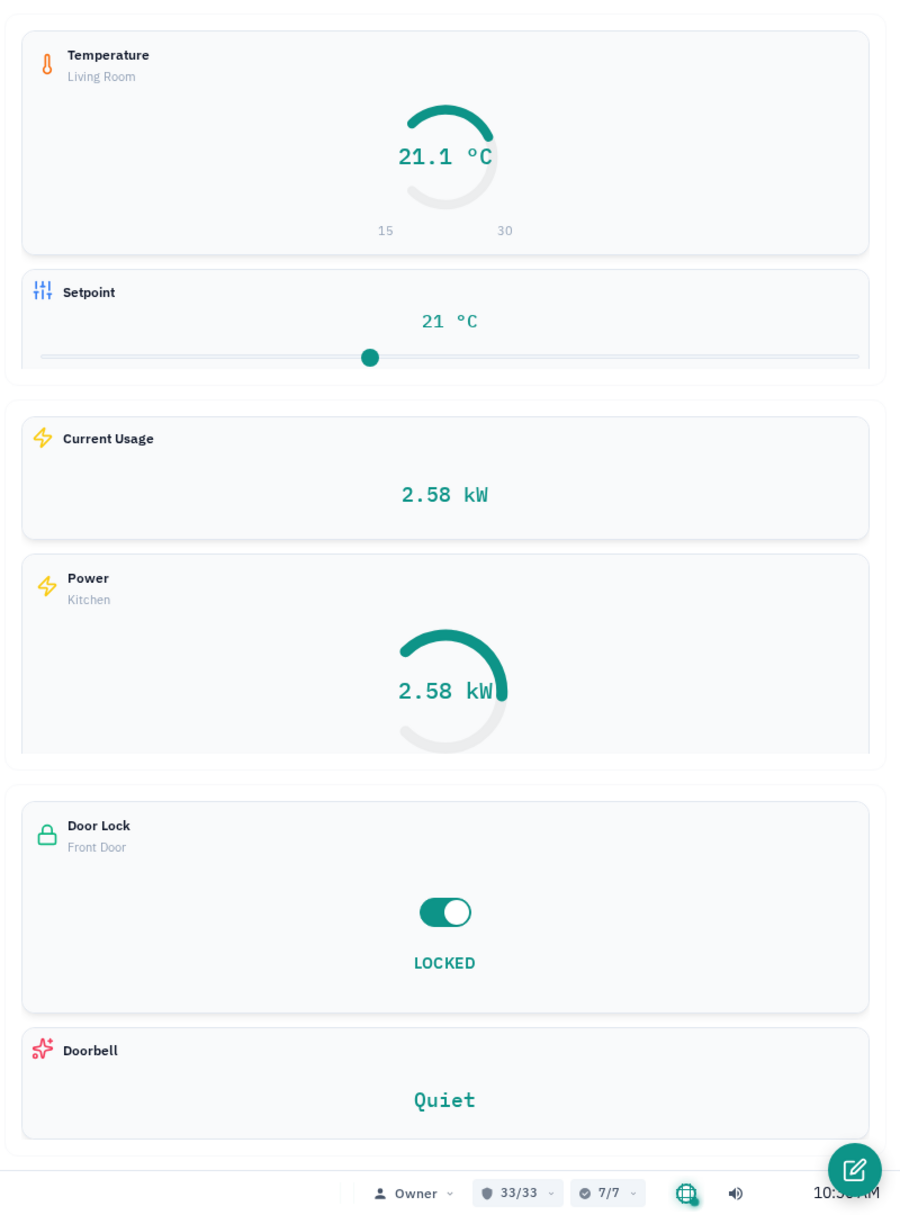
A live ControlBird dashboard: the same drag-and-drop, no-code building Home Assistant users already know.
a defensible history
a piece of real equipment
The moment a Home Assistant setup starts needing more than one home to answer for.
Most of the r/homeassistant posts describing this moment point to one concrete thing: a business partner needing their own login, an inspector asking for a log that does not exist, or a piece of equipment that showed up with a Modbus port instead of a Zigbee radio. If you can name the specific trigger, that is a good sign the setup has actually outgrown Home Assistant rather than just feeling due for an upgrade.
How It Connects to Home Assistant and Your Equipment
None of this requires abandoning the devices already wired into Home Assistant. ControlBird connects to many of the same ecosystems: Zigbee and Z-Wave devices through Zigbee2MQTT and Z-Wave JS integrations, ESPHome nodes, and Home Assistant itself through an integration that picks up devices via MQTT discovery, so what is already running does not have to be re-paired to new hardware. For the equipment Home Assistant was never really built for, Modbus is the connection most PLCs, VFDs, and industrial sensors already speak, and it is included in ControlBird Community Edition alongside MQTT, HTTP, CoAP, OPC UA, and email notification. For a full walkthrough of wiring up one Modbus device end to end, see this tutorial. OPC UA is also part of the core protocol set, and industrial protocols such as BACnet, DNP3, and EtherNet/IP are included as well, for the equipment that specifically calls for them.
Existing Home Assistant devices and new industrial equipment both land in one place.
The practical effect is that a move away from a pure Home Assistant setup does not have to mean ripping out the sensors already in place. The consumer side of the setup carries over, and the industrial side of the business, the part Home Assistant was never aimed at, gets a native connection instead of a community workaround.
Getting Told When Something Is Wrong
Home Assistant can notify you plenty of ways once you have wired up a notification path by hand: a mobile push through the companion app, a Telegram bot, an email script someone found in a forum post. Getting there is usually a personal project, assembled and maintained by whoever set it up.
In ControlBird, alarms are a first-class part of the platform rather than something wired together separately. You set a threshold, for example a walk-in cooler above a safe temperature or a compressor that has stopped responding, and a severity mapping decides how urgent it is. Deadband and delay timers keep a reading hovering near the line from chattering the alarm on and off. When the condition holds, ControlBird sends an email to whoever is set up to receive it. A technician can acknowledge the alarm, which records that someone has seen it without clearing the underlying condition, and shelve a known issue for a set period so it stops repeating while it is being worked, all visible to a manager's own account at the same time through role-based access rather than one shared login.
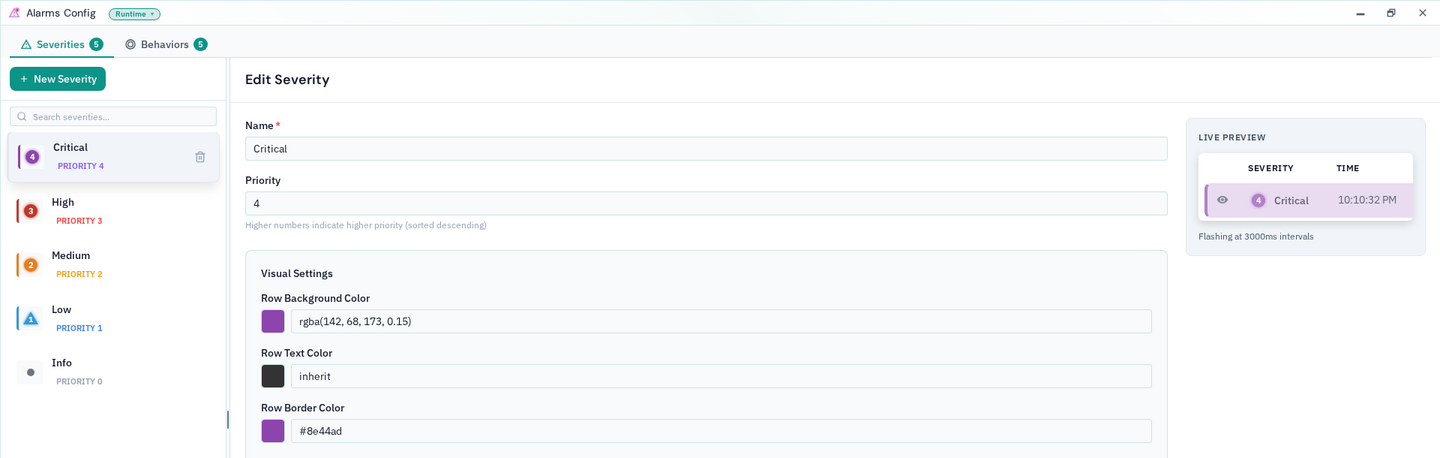
Alarm severities are configured once, centrally, rather than assembled per automation.
To be precise about what this is and is not: notification today is email, sent through the platform's built-in SMTP service. There is no automated phone call, no text message, and no retry-until-acknowledged escalation. If that kind of paging is a hard requirement for your operation, it is worth knowing up front rather than assuming it is included. See the alarms guide for the full reference on severities, delays, and shelving.
Watching Trends Over Time
A live reading answers what is happening right now. The question that tends to come up once a setup is running a business is different: what happened over the last month, and can you show it to someone. Home Assistant's built-in recorder keeps history for a configurable window, commonly a matter of days by default, with long-term statistics and external database add-ons available for operators willing to set them up.
ControlBird's built-in historian runs on the self-hosted Community edition and on ControlBird Cloud, so a defensible trend over weeks or months, the kind an inspector or an insurer might ask for, is there from day one; see the editions comparison for how the two compare. The live values, alarms, dashboards, historian, and role-based access described above are available either way.
Community Edition has no time limit and no feature countdown. It is a complete way to run the core of ControlBird, including the historian, alarms, and role-based access, on your own hardware for as long as it fits. Moving to ControlBird Cloud later is a matter of where it runs, not relearning the product. Commercial use requires a license: contact sales@controlbird.io.
A Low-Pressure Way to Try It
None of this requires committing to anything up front:
- See how the two platforms compare directly. The ControlBird vs Home Assistant comparison lays out the differences in more detail than this article, side by side.
- Click through a live demo. The public demo is a real running instance, no sales call required.
- Run the Community edition yourself. Community Edition starts with one line:
curl -fsSLO https://controlbird.io/compose.yaml && docker compose up -d
The Bottom Line
Home Assistant earns its reputation. For a single home it remains one of the best tools available, free, deeply supported, and unmatched for consumer device coverage. The pattern showing up across r/homeassistant is not a complaint about the platform. It is a sign that a specific setup has quietly become something more than a home, and the requirements that come with running a business, team access, a defensible history, real industrial equipment, an alarm someone can rely on, are a different job than the one Home Assistant was built to do.
If that describes where you are, see the fuller comparison, or weigh it against the broader gap ControlBird was built to fill and what the traditional SCADA alternative actually costs if a larger facility is also on the table. Otherwise, the demo above is the fastest way to see whether it fits.
Get Started with ControlBird
Deploy your first instance in under two minutes. ControlBird is free for personal use.
Explore the Docs →