If you run one greenhouse or a handful of them, you already know the night that keeps you up: the forecast dips toward freezing, the heater is supposed to be running, and there is no way to check from the house. Or a circulation fan seizes on a hot afternoon and nobody notices until the plants show it by evening. Or the well pump feeding your drip irrigation trips a breaker while you are at the farmers market. None of this needs a complicated fix. It needs a greenhouse monitoring system: something that watches the sensors that actually matter and tells you the moment one of them crosses a line, wherever you happen to be standing. Growers already have real options for this. A consumer sensor app bundled with a wireless probe kit, a Raspberry Pi wired up with a personal script, Home Assistant pressed into service past the house, or, for a much larger operation, a full SCADA package from an integrator. Each of those is a genuine answer for somebody. This piece covers what a greenhouse monitoring system actually needs to watch, what those routes give you, and where a general-purpose platform on ordinary hardware fits for a grower running one to a handful of greenhouses or a small farm.
In This Article
- What a Greenhouse Monitoring System Actually Needs to Watch
- Your Real Options, Side by Side
- Connecting Your Sensors and Gateways
- Seeing Your Greenhouse From Your Phone
- Getting Told When Something Is Wrong
- Trending Across the Season
- A Low-Pressure Way to Try It
- The Bottom Line
What a Greenhouse Monitoring System Actually Needs to Watch
Ask a grower what they actually want watched and the list is short, even on a complicated site. A handful of things account for nearly all of it:
- Air temperature and humidity. A frost warning at night, a heat spike that can cook a closed-up greenhouse on a sunny afternoon, and humidity that runs high enough to invite fungal disease are all the same kind of reading watched at different thresholds.
- Soil moisture. Whether a bed or a row is dry enough to need water, so irrigation runs on what the plant actually needs rather than a fixed timer.
- CO2, in an enclosed or supplemented greenhouse. Levels that fall too low during the day cap photosynthesis before anything else does, and it is one of the readings easiest to lose track of without a sensor doing the watching.
- Equipment status. Whether a vent motor, circulation fan, heater, or irrigation pump is actually running or actually open, not just whether it was told to be. A vent that failed to open is worse than one you forgot to open, because it looks handled from the house.
That is the whole job for most greenhouse and small-farm sites. A commercial grow operation with process control across dozens of zones and a staffed control room is a different project entirely. One to a handful of greenhouses, or a small farm with a well pump and a few outbuildings, is a much smaller job: a handful of sensors and one screen to check.
Your Real Options, Side by Side
Once you know what needs watching, there are, in practice, four established ways to get there for an operation this size, and a fifth built specifically for the gap they leave.
A consumer sensor kit with its own app, the kind sold alongside wireless soil and climate probes, is inexpensive and works right out of the box for a single greenhouse. The tradeoff is that you are locked to that vendor's own sensors and a fixed app you cannot rearrange or extend, and there is usually no path to add a pump or a vent motor once you outgrow reading temperature and moisture alone.
A Raspberry Pi and a personal script, wired to a handful of sensors and a cron job, can be genuinely cheap and gets you exactly the readings you want. The tradeoff is durability: it depends entirely on whoever wrote it, and a script only one person understands is a real risk once that person is busy with the harvest, or simply moves on.
Home Assistant, pressed into service past the single house it was built for, is a capable and popular route, and for good reason: it is free, it has broad device support, and a lot of growers already run it at home. The tradeoff shows up as the operation grows past one person checking one app. Its permission model is coarse rather than role-based, so giving an employee or a helper a limited view of just their greenhouse is awkward. The device ecosystem leans toward consumer wireless protocols rather than the industrial sensors a real irrigation pump or PLC-driven vent often speaks. And default history retention is short, so keeping a season-over-season record usually means adding and maintaining a separate database (InfluxDB, MariaDB, or similar). A closer comparison covers that gap in more detail.
A full SCADA package from an integrator handles all of this and far more, and does it well. The catch is scale: that category is priced and scoped for a commercial greenhouse operation or a processing facility with a systems integrator involved, which is a lot of platform and a lot of budget for one to a handful of greenhouses.
ControlBird, the platform we make, was built for the space between those routes: the sensors, alerts, and dashboards shape of a real monitoring system, configured yourself with visual tools instead of a fixed app or a personal script, on a self-hosted edition or on ControlBird Cloud hosting, both free for personal use. Commercial use requires a license: contact sales@controlbird.io.
If you are the only person who will ever look at the readings, a consumer app or a personal script is a reasonable, cheap answer. The moment a second person, a partner, an employee, or a family member checking in while you travel, needs their own view without needing to understand how you built it, that is usually the sign a general-purpose platform is worth the switch.
Connecting Your Sensors and Gateways
None of this works unless the platform can actually read your sensors, so it is worth being specific about what that takes. The Community Edition of ControlBird includes Modbus, MQTT, HTTP, CoAP, OPC UA, and SMTP for email notification, and that core set covers most of what shows up on a greenhouse or small farm. Many soil moisture probes, climate transmitters, and CO2 sensors sold for agricultural and industrial use speak Modbus RTU or TCP directly. Sensor boards built around an ESP32 or similar microcontroller, including a lot of DIY and small-batch kits, typically publish over MQTT.
How a greenhouse sensor reading becomes a dashboard tile, an email alarm, and a season-long trend.
ControlBird has no built-in Zigbee, Z-Wave, LoRaWAN, or 1-Wire driver. A cheap wireless greenhouse sensor kit built on one of those radios still reaches ControlBird, just not directly: through a gateway such as a Zigbee2MQTT or Z-Wave JS bridge, or a LoRaWAN network server, that republishes the readings as MQTT, or through a Modbus or HTTP device instead of a proprietary radio. That gateway step is normal and well understood, plenty of small-farm setups already run one, but it is a piece of hardware and configuration to plan for rather than discover after the sensors arrive.
For a full walkthrough of wiring up one Modbus device end to end, from the register map to a live dashboard tile, see this tutorial. Industrial protocols aimed at building and utility equipment, such as BACnet and DNP3, are included too, though they are not typical of a greenhouse; see how Cloud and Community compare.
Seeing Your Greenhouse From Your Phone
Once a sensor is connected, the next step is turning it into something you would actually glance at. In ControlBird's Layout Editor, you drag a gauge onto a canvas for soil moisture, a status tile for whether a vent motor is open, a plain reading for air temperature, and arrange them however makes sense for your site, no code required. A point configured as writable can carry a Toggle or Slider card instead of a gauge, so switching on a circulation fan by hand happens from the same screen you use to watch it.
Those dashboards are responsive, with separate layouts for desktop, tablet, and phone, so the same screen that makes sense on a laptop in the office also reads cleanly on the phone in your pocket. The editor itself runs on a phone too, so a layout can be adjusted from the greenhouse, not just from a desk.
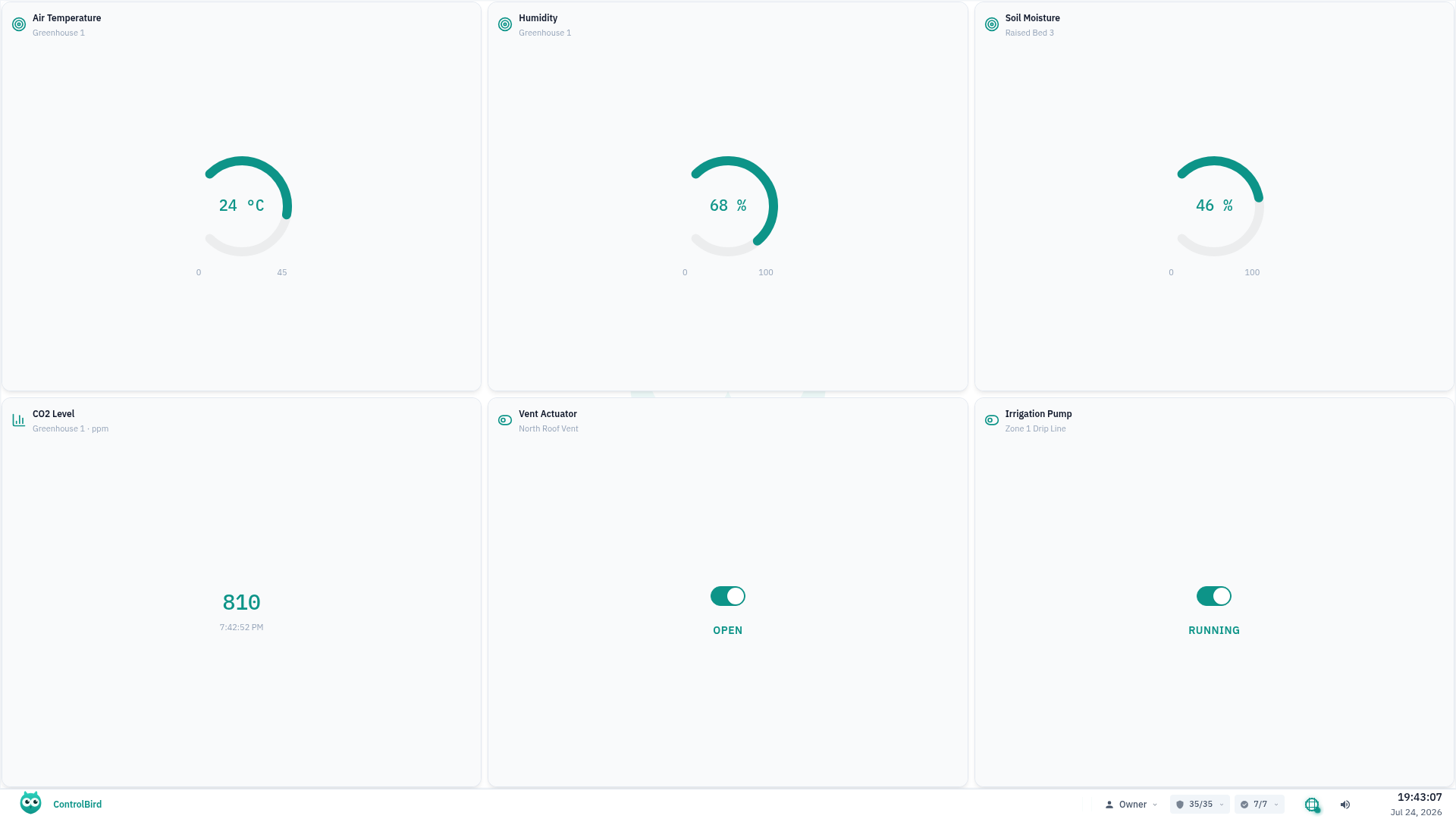
A live greenhouse dashboard: air temperature, humidity, soil moisture, and CO2 reading live, with the roof vent and the irrigation pump as controls you can switch from the same screen.
Getting Told When Something Is Wrong
Seeing the readings matters, but the actual point is not having to look. In ControlBird you set a threshold, for example air temperature below a frost line or a vent motor that has stopped responding, and a severity mapping decides how urgent it is: a slow drift toward the line can read as a warning, a hard breach as critical. Deadband and delay timers keep a reading hovering near the edge from chattering the alarm on and off.
When the condition holds, ControlBird sends an email to whoever is set up to receive it. Someone can acknowledge the alarm, which records that it has been seen without clearing the underlying condition, and shelve a known issue for a set period so it stops repeating while it is being worked.

A high-temperature alarm in the alarms view, with severity and acknowledgment status visible at a glance.
To be precise about what a frost alert at 3am actually is: it is an email, sent through the built-in SMTP service. There is no automated phone call, no text message, and no retry-until-acknowledged escalation. For a greenhouse where a single frost night can wipe out a crop, that is worth knowing up front rather than assuming a call is coming. See the alarms guide for the full reference on severities, delays, and shelving.
Trending Across the Season
A live reading tells you what is happening right now. A trend tells you what is changing, and for a greenhouse that usually matters more over a season than in any single moment: soil that dries out faster week over week as a root system fills a bed, a CO2 level that dips earlier in the day than it used to, or a heater that runs longer each night as the weather turns.
The built-in historian, which is what makes that kind of season-long chart possible, runs on the Community edition and on ControlBird Cloud, so a defensible record across a growing season is there from the start, whichever way you run it. See the editions comparison for how the two ways to run it compare.
A Low-Pressure Way to Try It
None of this requires committing to anything up front:
- Check what your sensors already speak. Look for a mention of Modbus or MQTT on the sensor itself or on its gateway before assuming you need new hardware.
- Click through a live demo. The public demo is a real running instance, no sales call required.
- Run the Community edition yourself. Community Edition starts with one line:
curl -fsSLO https://controlbird.io/compose.yaml && docker compose up -d, or follow the Community Edition walkthrough for a guided version.
The Bottom Line
A greenhouse monitoring system does not need to be complicated to be worth having. For one person watching one greenhouse, a consumer sensor app or a personal Raspberry Pi script remains a fair, cheap answer. What changes the calculation is a second greenhouse, a second person who needs their own view, or a piece of equipment, a pump, a vent motor, a CO2 sensor, that a consumer app was never built to read.
If this is closer to a small farm than a greenhouse, this piece on pump station monitoring and this one on tank and well pump alarms cover the same sensors-alerts-dashboards shape for that equipment, and a tier-by-tier look at what traditional SCADA costs is worth a look if a larger operation is also on the table. Otherwise, the demo above is the fastest way to see whether it fits your greenhouse.
Get Started with ControlBird
Deploy your first instance in under two minutes. ControlBird is free for personal use.
Explore the Docs →